Summit Ridge Roofing
Residential roofing, Austin and Central Texas
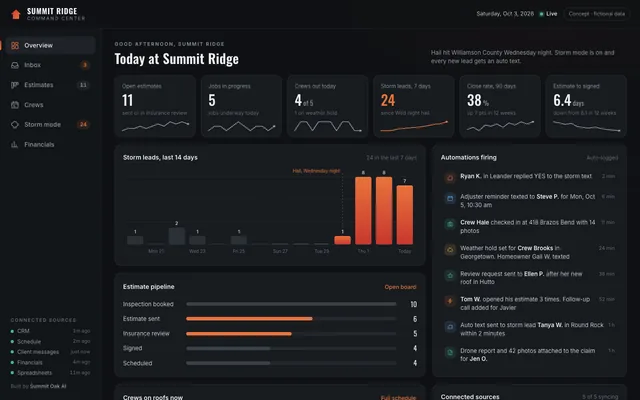
- Estimates through insurance review
- Crew schedule with weather holds
- Storm mode for hail leads
The spreadsheets, the open tabs, the copy-paste between systems: that is your team's day disappearing. We build custom internal tools that hand the hours back and take the errors with them.
Summit Oak AI is based in Austin, Texas, and works with clients nationwide.
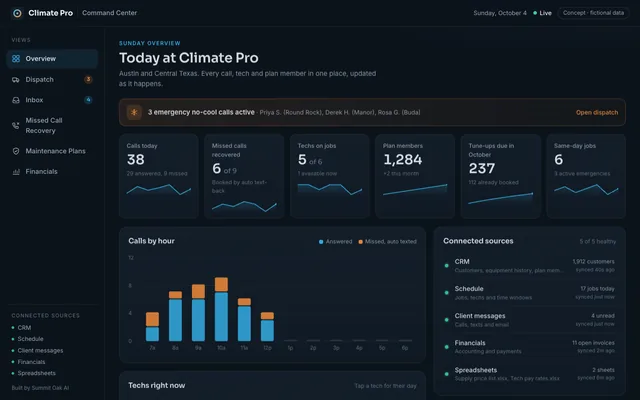
A sample command center for a home services company: new leads, today's crew board, invoices, and team tasks in one place, updating live. Tap a tile to switch views.
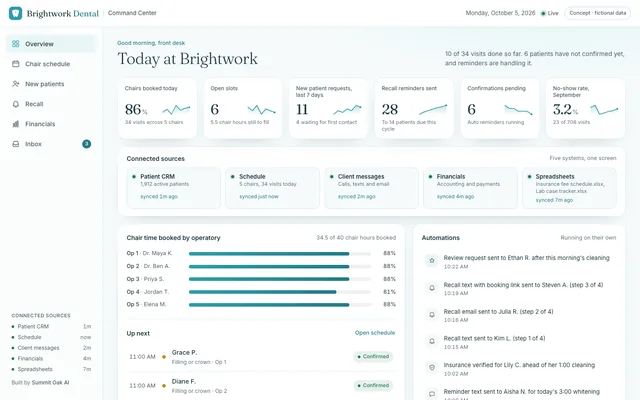
Three command centers for businesses from our website concept builds. Each one is shaped around that trade's real day: estimates and crews for a roofer, dispatch and missed calls for HVAC, chairs and recalls for a dental office. Open one and click around. Everything updates live.
Residential roofing, Austin and Central Texas
Heating and air, Austin and Central Texas
General and cosmetic dentistry, Austin
Concept builds with fictional data. Yours is built around your business, your tools and your numbers.
A command center is one custom screen your business is run from. It pulls live from the tools you already use, writes back to them, and replaces the spreadsheets, open tabs, and copy-paste work your team currently juggles to get through a day.
A command center is its own build. It pulls together the systems your business already runs on: your CRM, your phones and texts, your scheduling, your ad accounts, your payments, and the field tools your crews use on the job. Instead of logging in to six places to know what is happening, your whole team runs the business from one.
Most small businesses do not have a software problem. They have a seams problem. The CRM is fine, the calendar is fine, the invoicing tool is fine, and the day still leaks away in the gaps between them, because a person is the integration.
Where it helps, we use the same pieces behind two of our other services: automation that moves data between those systems without hands, and live reporting that shows what is true right now. They are building blocks, not the product.
9 Line Agency, a veteran lodging company, had a team hand-building lodging flyers: screenshotting photos, copying amenities, rebuilding PDFs, emailing them out, three properties per person every time, redone from scratch whenever a client wanted different options. We replaced the whole process with a custom tool. Now they paste one link into a spreadsheet and a finished web flyer builds itself.
"Legit 6 to 8 hours a day."Connor Cullip, 9 Line Agency, asked directly how much time the tool saves his team
And the errors that came with rebuilding those flyers by hand, the outdated photos and mismatched descriptions, went with the manual work. That is the pattern every command center chases: the hours come back, and the mistakes leave on the same truck. The full story is on the case studies page.

Before: flyers rebuilt by hand. After: one pasted link, one finished web flyer.
It is one custom screen your business is actually run from. It pulls live from the tools you already use, writes back to them, and replaces the spreadsheets, open tabs, and copy-paste work your team currently juggles. Instead of checking five systems to know what is happening, you check one.
Off the shelf software makes your team adapt to it. A command center is shaped around how your team already works, so nothing important lives outside it and nobody maintains a workaround spreadsheet on the side. You own what we build, and it only includes what you actually use.
It depends on how much manual work it replaces. One client, a veteran lodging agency whose team hand-built property flyers, put it at 6 to 8 hours a day in his own words. Across engagements, clients commonly get 15 or more hours per week back and cut manual tasks by about 85%.
Errors are the quieter half of the cost. Every manual copy, rebuild, and re-entry is a chance to ship a wrong price, an old photo, or a stale status. When the command center pulls data from the source automatically, that class of mistake goes away with the manual work.
About 3 weeks for most systems, from discovery to your team running on it. We start with the workflow that eats the most hours, ship the command center around it, and expand from there.
Last updated: September 2026
Tell us the process that eats your team's day. We will show you the command center that ends it, the timeline, and the hours you get back.
BOOK A STRATEGY CALL